Jonjo Hemmens
Senior Environment Artist at That's No Moon

Detective's Room Blockout (UE5)
Work In Progress / 17 February 2023
Hey all, been a little while since I wrote a blog post, but I recently started a new project and thought it would be fun to get back into the swing of blog updates.
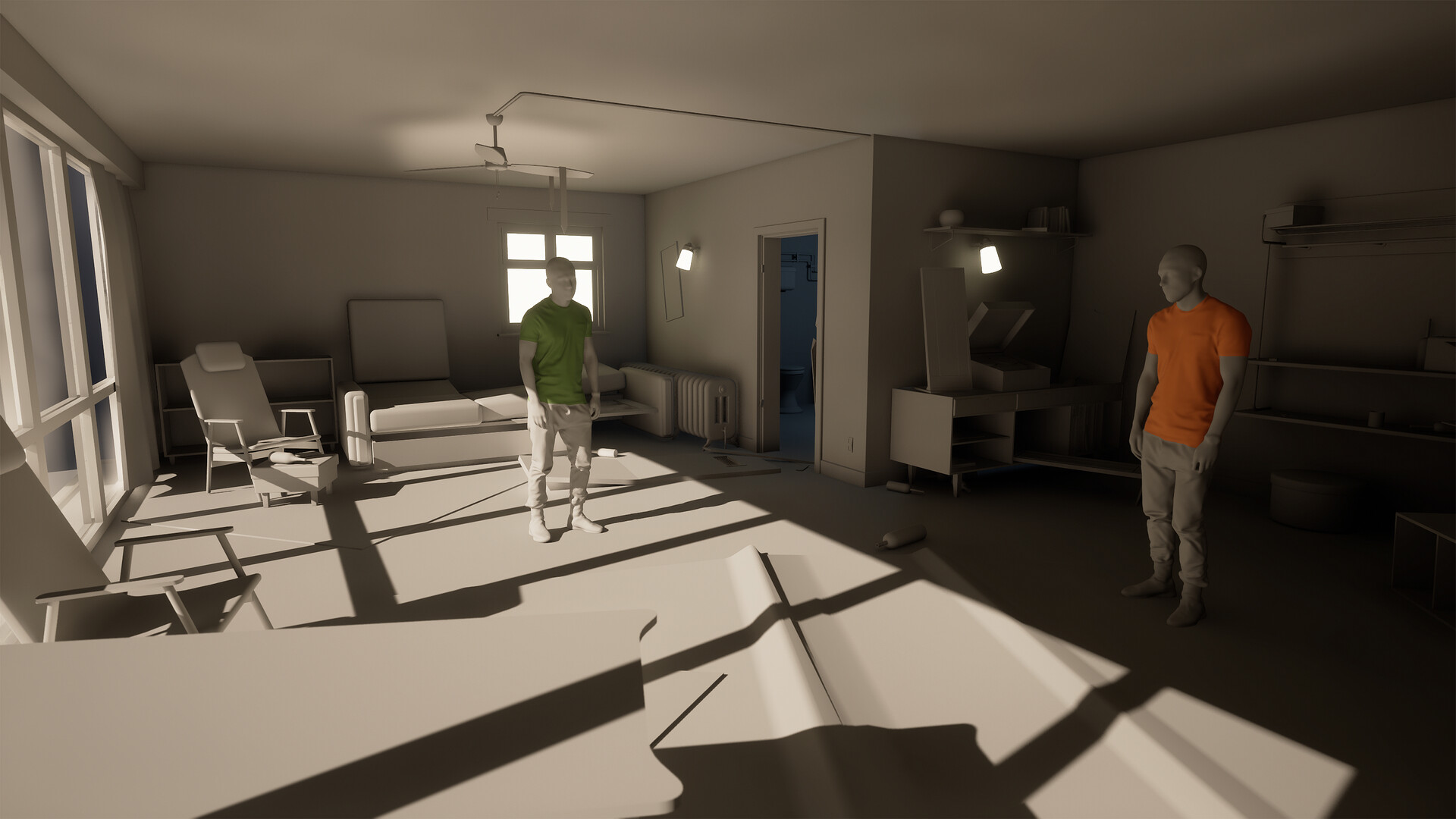
About 2 and a half years back, I was recommended by a friend to take a look at Disco Elysium. I was skeptical at first as it's not the genre of game I would normally play, but after the first in-game day, I was absolutely hooked and it has quickly become my favorite game of all time.
The art style of the game is so interesting, and I have wondered for a long time how I could adapt into a semi-realistic style, so I'm going to try give it a go. I decided to pick a relatively small space, so The Detective's destroyed hotel room in the Whirling in Rags seemed to be a great spot. I worked on a project called Will's Room back before I got into the games industry, so I think it'll be nice for me to see how my eye has changed over the years.
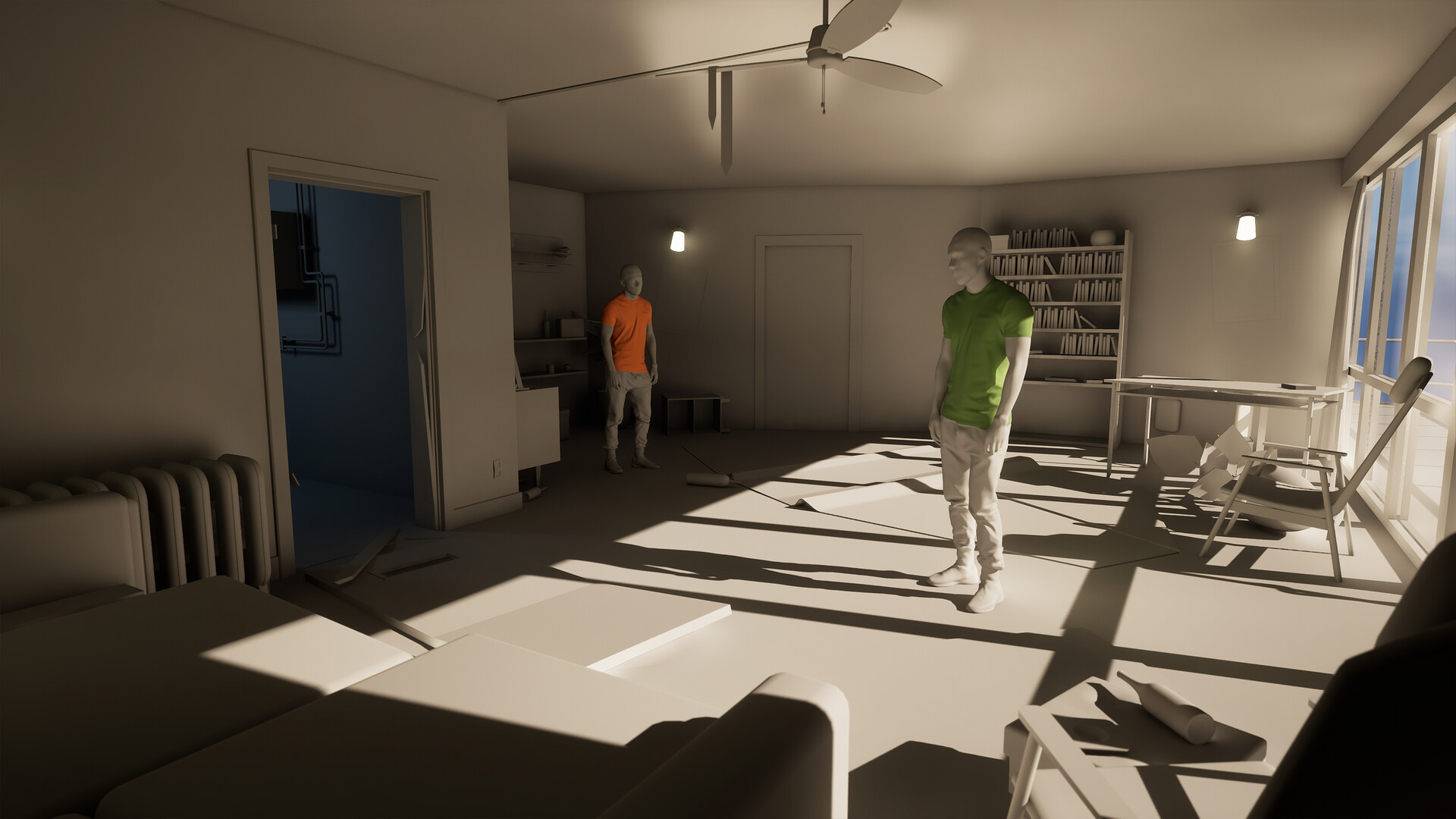
I plan on studying the texturing in Deathloop and Dishonored 2 and mixing it with the brush strokey style of Disco Elysium. I've not done any texturing this stylized before so If I ended up failing this horribly I hope you'll let me know.
So far I've just about got the scene blocked out, things like lighting are still a big wip and I'm not sure where I which direction to take that right now. This will be my first project in UE5, as well as my first project using Blender as my main modelling tool. Lots of firsts!

Dragon Environment Collaboration
General / 06 April 2022
I recently collaborated with Sophie Shepherd on a scene for her a Dragon animation she was working on. I pretty much just re-built some stuff from my Hemlock forest project and switched up the lighting a bit. Check out her Artstation post here - https://www.artstation.com/artwork/nENmK4
Hemlock Forest - Speedtree Article
Article / 20 January 2022
https://store.speedtree.com/artist-highlight-jonjo-hemmens/

I was asked to write a piece for Speedtree breaking down some of the things I learned about the tool during my Hemlock forest project. There's also some workflow tips, tutorial recommendations, and some things I wish I knew as an aspiring environment artist. Give it a read :D
https://store.speedtree.com/artist-highlight-jonjo-hemmens/
Hemlock Forest - Adobe / Substance Article
General / 29 September 2021
https://substance3d.adobe.com/magazine/foliage-art-for-forest-environments-with-jonjo-hemmens/

I wrote for Adobe / Substance on my Hemlock Forest project. I cover a bunch of different things I learned throughout the process, such as making plants, workflows for designer, and how I put it all together in Unreal. check it out!
https://substance3d.adobe.com/magazine/foliage-art-for-forest-environments-with-jonjo-hemmens/
80's Vending Machine - Experience Points Article
General / 20 June 2021

I wrote an article for Experience Points about my 80's Vending Machine project I did last year. There's a bit of breakdown, some soft skills advice, and a little art theory.
Check it out here - https://www.exp-points.com/80s-vending-machine-creating-a-highly-detailed-life-like-prop
Learning Organics: 02
Work In Progress / 10 April 2021

What have I been up to since the last post?
TL;DR - More of that foliage stuff with pictures :)
Since the last blog post I've been working away on lots of different things. I've been making ground materials, tree variations, more small plants, created a landscape material, begun work on a new type of tree bark, and started bringing in some Megascans assets to see how they work with my assets.
I've still got quite a way to go, but things are starting to feel right. All of the shots here are not of any final scene, they're all just part of a asset testing area.
More Hemlocks

In the last blog post I showed off the Western Hemlock Bark and Tree that I'd been working on. I was really happy with my first proper tree, and have been making size variations to show the tree in different stages. I've created some more medium size variations, a large one, and a bunch of small ones. I've also started working on the Western Red Cedar textures, but they're looking a bit rough right now, will hopefully look better by the next update.

I've also updated the marmoset scene a bit, still not quite what I want, but it's a step in the right direction. The textures haven't change much since the last update, still need to work on some feedback. The Western Hemlock bark needs some extra detail and albedo variation as it looks very clean and pristine compared to the scan assets I've brought into the scene, and even to some of my ref images.
Small Plants

I've made a bunch of small plants to join the wild strawberry and the poison ivy, and I feel like the repetition of making these has built a tonne of confidence in creating plants. I've stuck to the same workflow of modelling in Zbrush and texturing in painter, and I've got some good presets to help speed me through the process now. There are some I'm really happy with, and some that could use some love, but I'll probably leave these where they are for now.
Ground Materials

As I mentioned in the last blog post, I'm not very experienced in using Substance Designer, and creating the ground materials has proven to be a pretty big challenge. I tried making a dirt material a few different times, and each time I got overwhelmed by the amount of things I needed to create in my reference. Sticks, dead needles, fallen leaves, rocks, etc. Trying to get it all into one graph became quickly confusing and also pretty laggy, so I decided to split each scatter component into a separate graph and create variations to sample in each of my ground materials. Trial and error is slowly improving my workflow. Studying the works of Daniel Thiger, Willi Hammes, and Pete Mc Nally, amongst others, all helped work out how to build these materials and what to aim for.
Landscape Material
Instead of using distance field blending like I've done before, I thought I'd experiment with Runtime Virtual Texturing. I followed this video by MR3D-Dev on how to set it up for a project, and also picked up Kay Volbeda's RVT Plugin. Although I didn't use assets, it was very useful to see it used in a scene and take apart his set up. The blending with RVT looks really good, and the controls per material are very flexible. Definitely better than using the old distance field method.

Megascans
One of my goals for the project was to see if I could get my assets looking good alongside Megascans assets. I've found it's been good to train the eye and to breakdown references for the smallest of details. In some of my asset arrangements, the result is fairly convincing, but in others, there are still a few detail gaps. The scans provide a very good quality assurance pass for my work and it's definitely helped highlight some gaps in my work.
What's next?
Here's another list of what I want to try achieve for the next update;
- Plant cover ground material
- Pebble shore ground material
- Ivy cluster assets
- Make some waterfall vfx
- Get a river spline
- Western Red Cedar material and branches
- Start assembling the scene.
I managed to stick to my last list pretty well, so here's hoping I can do the same again.
Thanks for reading to the end if you managed, as I said last time I'm just learning stuff right now so if you have questions the best I can do is shoot the resources that taught me your way. Thanks again to the lovely people keeping me motivated and focused on this one, I love ya.
Learning Organics: 01
Work In Progress / 29 January 2021

So, what's all this then?
TL;DR - I'm learning how to make foliage and writing about the journey. pictures included.
After wrapping up the Vending Machine last year, I decided that I'd learned enough about prop creation for the meantime. I've in no way mastered the craft, but I'm happy with what I've learned, and it's time for something new. I know very little about creating foliage, so I want to learn more about it and the tools used to create it.
My desire for this project is to not make every plant for a scene, but to develop the skills to be able to tackle foliage for projects when I need too. I find myself too worried about working on certain scenes or concepts because I can't tackle the organic elements and I hope by the end of this project I will have slain that fear.
What I've done so far
So far, I've been working on a collection of different foliage assets that you might find in the Pacific Northwest of America. If all goes well and I keep my motivation for this up, I plan to create a small forest scene in that area. As of right now, I've been working on a Western Hemlock Tree, Western Sword Ferns, English Ivy, Wild Strawberry Plants, and Poison Ivy.
Western Hemlock - Tree

The Western Hemlock was the first asset I approached as it required the steepest learning curve. The Western Hemlock was a pretty good starter tree as it's got simple forms. The shot above shows the only variation I've made so far, "Medium_01". I plan to make smaller versions, medium variations and much larger ones. Apparently the tree can grow up to 175 ft tall, which will be a fun challenge to create.
I'm happy with the main shape, but there's still a few lingering issues with this first tree. The top of the tree doesn't look quite correct, I struggled with getting the top of the tree to bend properly as I'd seen in my ref. The top of the tree is supposed to slump a lot more, and the branches are supposed to get much thinner. I've struggled to achieve this with my current branch and leaf set up, and I'll change it for the next versions.

Example of the top of real Western Hemlock
My atlas is missing some smaller pieces and individual pine cones / needles, but I'm pretty content with the main branches so far. To create these, I modeled and textured some high poly needles and pine cones, then brought them into Speedtree to assemble some branches using the basic branch template. Some of needles are clipping with each other in places, but I haven't been able to work out how to use Collision. I've found that the Speedtree YouTube tutorials vary massively in quality making it a little tough to learn from there.

Western Hemlock - Bark


Old Marmoset Render, Still trying to work out a nice way to render materials in this. Cubes are so much easier!
I wanted to create two versions of the Western Hemlock bark, one with sawn / fallen branch spots, and one without so that I could blend between the two based on tree height. The shapes were a lot of fun to work out, and creating the sawn branch spots was probably the most fun I'd had in Designer. I'll probably share shots of the graph when I've un-spaghettied it.
Again, although i'm happy with the bark, there's still a few issues to resolve. To pick out a couple of big ones; the sawn branch version has some awkward double lines I need to fix, there are some really obvious areas of small bark cracks which don't blend in nicely, and the textures could use a bit more colour variation. I'm not sure whether I want to add macro variation in engine or push the textures further.

To help with break up on the all the trees and assets that require it, I've been adding vertex painting to my materials. So far, I've been experimenting with some different moss types. On the left, you have a more common fibrous and thick moss. I'm not getting the read or blending that I'd like, and I feel like there isn't enough colour variation throughout. It's not been the easiest thing to create in designer, but I'll keep iterating on it and studying the ref until it feels good. On the right I've made an older, drier moss that you might see higher up on trees and in drier seasons or climates.
Western Sword Ferns

The Fern was the first big plant for the project, but it went a lot smoother than I had imagined. I created the main leaves in Zbrush / Painter and brought into Speedtree for assembly. I've created a couple of small, medium, and large variations and I imagine there will be enough variety if they were thrown into a forest scene.
I modeled in some smaller fly away leaves to add a bit of a 3D feel to what is just bent flat planes. I probably could have pushed these further as they don't break the silhouette as much as I would have liked, but the effect is cool from some angles. I could also optimize these further and make better shapes with the amount of geometry I've spent, but these are lessons to take to the next assets. I also learned that I should paint my vertex colour at this stage to avoid having to try and paint it on finished clusters...

To create the young unfurling branch, I hand placed the leaves in Maya, created a furry vine in the middle with Xgen, Textured in Painter, then used Substance Designer to bake down the textured high poly model onto a side and front plane. The crossed billboards look pretty good for the front, but I had to model the head in 3D as it just wasn't looking great in 2D.
Finally, I created some fallen scattered branches that can be placed underneath the ferns. I'll make a couple of variations of these as I've found they really help age the plants and ground them in the scene. I also added some very basic hueshift and desaturation controls so I could age and decay some of the fallen branches.

Decals
I've not dived too deeply into decals this project, but I've still learned a couple of cool things in designer. The first thing I created was this cracked bark decal generator. It relies on a shape input, but the rest works it self out quite nicely. Although my ref for these cracks are pretty clean, I think it could do with some more details like little moss and dirt spots and build up.

I've also created some scattered floor leaves and needle decals to place under the plants. I discovered the atlas scatter node (which is probably very much common knowledge already) and it basically does all of the scattering work for me. I bring in my textured high poly sheet, create a material, plug the material into a atlas scatter node, add some colour variation, and bring it into engine. Simple as that.
I'm hoping that the scatter node will be helpful for blending when I start working on ground materials. Being able to blend these in should help tie the scene together nicely.

Ivy
For each leaf and pine needle, I'm creating high resolution high poly / baked assets. I check them out in Unreal before starting to assemble my atlas and clusters just to make sure the material is reading okay. These ivy leaves look a little over-detailed and noisy, but the extra noise helps when they're baked down into clusters.

I've been building various Ivy Clusters in Speedtree, but I've encountering more and more issues with collision. It takes me quite a long time to get a nice looking cluster without too much clipping, but I've probably got enough clusters now to create an atlas.

Wild Strawberry and Poison Ivy
The most recent addition to the project has been some ground cover plants. I hope to get 5/6 different ground cover plants with some different flowers and colours. As of right now, I've got some medium and small clusters of Wild Strawberry plants and Poison Ivy. Smaller flowering and fruit bearing plants are going to be the best way to add nice little bits of colour for this scene. They look a little noisy right now on the blockout floor, but I imagine they'll lose a lot of that contrast when placed in forest dirt. I felt a lot more confident building these compared to the ferns which was a nice achievement.

What's next?
Here's a little list of things I hope to achieve for the next update;
- Ground dirt material
- Western Hemlock variations
- Western Red Cedar tree and materials
- Some small grass tufts
- Oxalis bloom clusters
- Rattlesnake Plantain plant
- Orange Honeysuckle plant
No promises that I'll get them all done, just going to focus on learning something along the way.
Thanks for reading, I didn't go into much detail about where I've been learning from or how I've been making things, so if you have any questions, feel free to comment or shoot me a DM. Or you can wait for a more comprehensive write up if I ever finish this. To the people who've been giving me feedback and tips so far, thank you very much, it means a lot!
Art Graveyard: 01
General / 08 May 2020
Hey all, I hope you're all managing okay with the quarantine, and keeping yourselves busy with art, gaming, movies, and all that good stuff.
Since I started my full-time job at Creative Assembly, I've made a big effort to keep doing personal artwork. During this time, I've given up on a lot of projects for a variety of reasons, but mainly because they're just not fun to come back to at the end of a work day. Up until my first job I had taken almost every project to completion, and I've found it to be uncomfortable to leave projects unfinished. When I finished my recent props or finished freelance work, I kept thinking about returning to these large projects. Even though I had stopped working on them for a good reason, I felt compelled to go back just out of habit.
All these unfinished projects have been a serious distraction that took focus away from learning, and my more meaningful projects. So I've decided just to dump all my dead projects on my Artstation blog in a big art graveyard so I no longer have to consider working on them. They're all at various stages of completeness, and also various stages of shit-ness. I doubt this will be my last Art Graveyard either, so look forward to more crap next year!
TL;DR - I'm posting unfinished kinda shit work here so I can move onto new stuff

This was a scene I was working on based of a concept by Sylvain Sarrailh. Had fun blocking out, experimenting with lighting. Ended up doing a couple of props, then just focusing on just the TV.


A coffee machine I was making for my 80's props collection. Texturing was 60/70 percent done, lots needed reworking and tweaking. Presentation and lighting was tough and my painters files caused tonnes of crashing so I decided to just shelve it.

Some of the props I was working on for these scenes. Again, various levels of shit-ness. Most are half finished / scene clutter.

A tunnel for a heist scene I was working on. Some more shots of this below.


This was all one big scene and proved to be a bit too large considering my schedule and beyond the blocking out phase there's as much room for learning as I would have liked for a project this large. So I took the TV, fridge, and Vending machine, and focused on making those really high quality instead.


A couple of pallet jacks I got about 40 percent of the texture work done on. Wanted to have a cleaner one, and a more pristine one. Learned a lot about how to set this up nicely in substance, and didn't feel like pushing to the end would teach me much more.


And finally, I decided to try and throw some mega-scans assets into my national bank corridor for fun. Didn't end up getting too far with it as I didn't actually feel there was much to learn with the process.
To wrap up, here's some stuff that isn't dead and is still alive and kicking. I've been working on a vending machine project, and have been making some soda cans and crisp packets to populate it with.
Cheers for reading through to the end, stay safe everyone :)


Game Dev Discussion Episode 41: Jonjo Hemmens
General / 12 February 2020
I had a great chat with Alex about my texturing process, the debate on megascans and their value, seperating yourself from your art work, and where our futures are hopefully going to take us. Despite the tech issues, it was a great talk, hope to be back on the podcast soon!
Take a listen on Youtube, and check out Alex's portfolio on Artstation. He recently became a member of staff, so give him some love!
https://www.artstation.com/alexbeddows