80 Level - Art Tests and How To Approach Them

General / 11 July 2019

Hey guys, I wrote a piece for 80 Level about Art tests recently. I got the chance to interview some incredibly talented industry artists about the subject and get some advice for people looking to tackle them, and break into the industry. I hope it helps! Big shout out to Jacob Claussen for letting me use his art test in this piece!

https://80.lv/articles/game-art-tests-and-how-to-approach-them/ 


Snow Seige - Polycount

General / 01 May 2019

Hey people :) 

Started a Polycount thread for my latest personal project, and would love to get some crit on it. It's still early days, but i'm hitting a lot of blocks, so would love to hear some suggestions / feedback if any. Cheers!  https://polycount.com/discussion/211004/wip-ue4-snow-seige#latest 


Invasion - Blocking out

Work In Progress / 24 March 2019

Thought I'd write a quick blog post about my new environment piece. I've been trying a load of new stuff with this project, and there's so much fun stuff to come. The project is still in it's early block out stages! This post will just be about my progress so far.

I started with the desire to learn more about landscape materials and terrain tools in UE4. I started with the snow ground tutorial from Jacob Norris, and decided to create a whole scene with that knowledge as a foundation. Whilst searching for references for the project, I came across Sergey Zabelin's "Castle in a snowy forest" (https://www.artstation.com/artwork/3w1EJ ) which really inspired me. I decided to start with his concept as a foundation, and work from there.

The mountains were the most important part of this scene, so I worked on those first. Very recently, Quadspinner (creators of geoglpyh for Worldmachine 2) put out their own terrain modeller, Gaea. The tool takes a lot of great tools from Geoglpyh and Worldmachine as well as adding some new stuff. It's got a lovely UI and rarely lags. It's pretty new so there's LOTS of bugs, beware if you want to use it in production! The tool is free with a 1k texture map limit, but to get around this, I exported the high poly mesh mountain to bake onto a plane for texturing in Substance Designer. The normal map can be used to generate height, curvature and AO info with little effort and no cost :) 

Disclaimer - Rocks in the scenes (and the thick curvy tree) are scans from Quixel and the Epic Games Boy and his Kite demo that I've run through my master material. Unlike my other projects, I've decided to use some assets that I haven't mostly authored so I can put larger scale scenes together a bit quicker. 

I decided that I wanted to create a large castle on top of the mountain, with a treacherous climb to reach it's entrance. I also wanted to create a large border wall stretching across the mountains to give a reason for the position and attack of the castle. Viking style invaders trying to break into the land of a medieval French style kingdom. 

The siege camp is in its earliest blockout phase. I'm working out where I want to place tents, fortifications, wagons, equipment, etc. in a realistic manner. More research into this area is necessary before moving forward I think. For the tents and flags, I plan on utilising some of the techniques show by Krzysztof Teper in his Korath scene to get a nice wind blowing the fabric.

 I used a bridge and a small river as a division between the two sides. This helped seperate the scene into two digestible areas; the siege camp and the castle.

The castle is still in a really early blockout phase, and I will need to start working out how I want to make a kit out of the pieces. So far I have been experimenting with splines, but I've been struggling to create walls on the Z Axis without the meshes freaking out, so more research needs to be done there I think. I will also need to add significant destruction and decay to these areas, as I want the siege to have been successful, destroying significant parts of the castle in the process.

That's about it so far. Still so much to block out and iterate on! Let me know what you think, or if you have any questions about the scene so far don't hesitate to ask. 

Cheers for reading!
Project Snow - Master Material Stuff

Work In Progress / 07 March 2019

Project Snow - Master Material Stuff

Thought I'd show some early work on my new environment piece. As I've avoided doing proper organic scenes, I decided to jump in and do something I'd never tried before.

I decided to do a full exterior scene based with a large amount of variety. So far, I've been working on my landscape material, blocking out, master materials, as well as some large mountains I put together using the just released Gaea. The master material has been the most interesting part of the project so far. After seeing the landscape and level kit of Star Wars: Battlefront, I wanted to try create something similiar in Unreal. I wanted to create a versatile kit that minimised on the amount of meshes I had to make to give the scene enough variety. With university studies coming to a close, every bit of time saved with this kit is super valuable. 

I've used quixel props here to demonstrate the master material. 


Here's some of the functionality of the master material;

The material applies snow to the top of assets through a material layer blend. Also includes vertex painting functionality for any areas you do/don't want snow. 

The material also blends the meshes into the landscape. For this effect, there's a mix of a distance field blend (link to the resource at the bottom) which grabs to world position and the distance to the nearest surface and blends the landscape snow where it intersects with another object. 

There's also use of a subtle pixel depth offset just to blue the harsh edge between the props and the landscape. 

The shader is a little expensive with all the bells and whistles applied, but it really help sells the look I want. I binged a lot of tutorials to put this one together. Here's a nice list of resources if you'd like to put something similiar together for your own projects.

 The material also hosts support for all the standard hueshifts, detail mapping, masked albedo textures, optional emissive values, etc.

Anyway, more work on this project to come (possibly in blog form, or not, we'll see).


Resources - 

https://gumroad.com/l/BVVFy

https://www.youtube.com/watch?v=HDluA1f5gzw


Repair Bay 12 - Time for a break

General / 27 September 2018

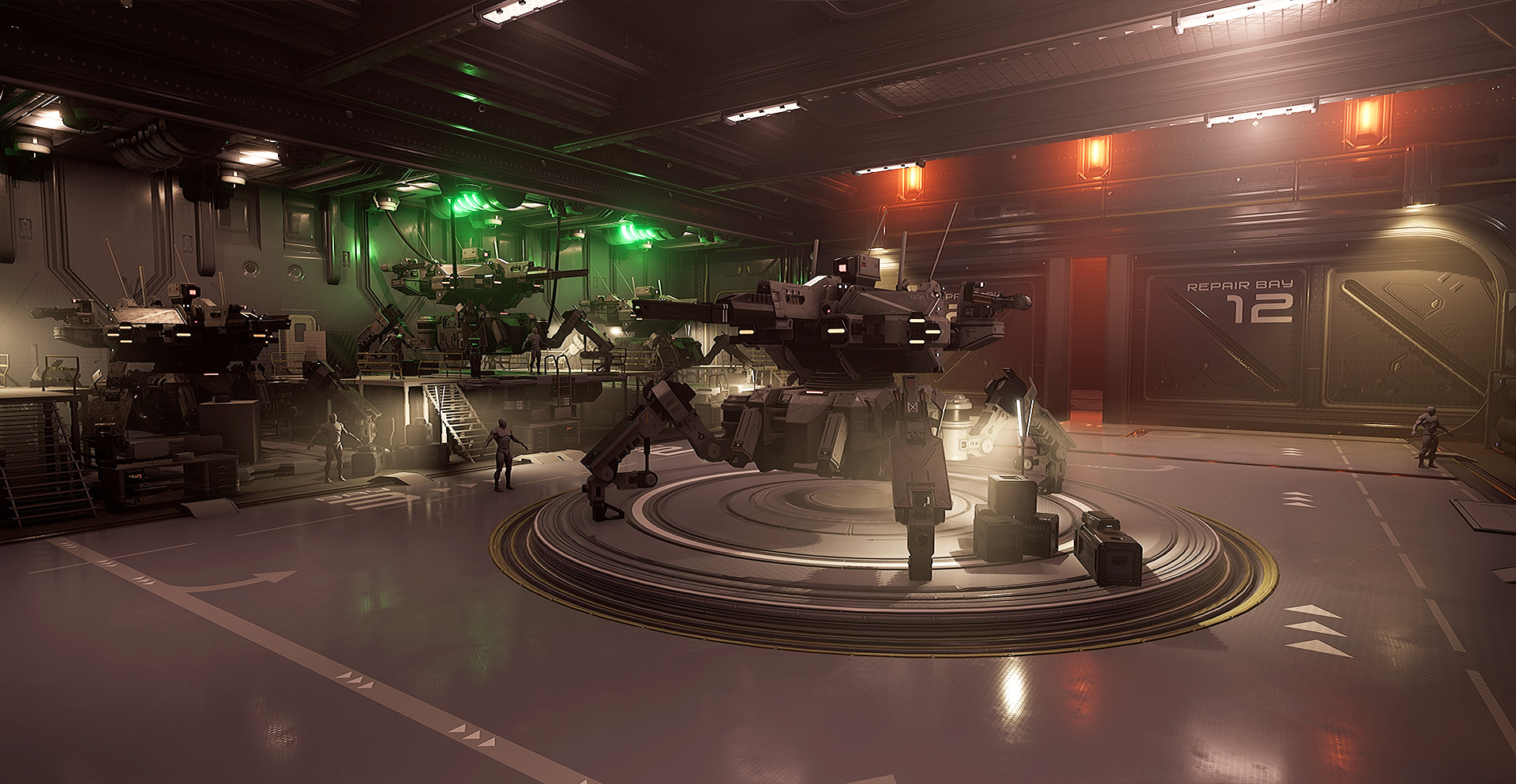
Hey people, felt like doing a bit of a blog post on something I've been working on, in spare time over the past few months. 

The project is a hangar to house to large mech (based on KaranaK's amazing concept) I created a few months back. However, I've felt like it's becoming a chore to continue. 


For this project, I've been following Alex Senechals "Advanced Tiling Trim" tutorials, to see how I would but his workflow into practice in my own sci fi scene. To briefly describe the workflow, you take a normal map trim sheet, and unwrap your meshes onto that in your first UV layout, then you create a second for a tiling texture to sit on top.  


The workflow helps to cut down on texturing time massively. It allows you to cut down on the amount of textures, and give you more time to create nice shapes with your modelling tools. I've had some lovely results with the workflow so far, and I've had a blast messing around with cool sci-fi shapes.


I usually struggle to just drop projects, or leave them unfinished, but it's not been easy to keep going working on this one. With uni starting again, I have less and less free time, and coming home to work on this just isn't keeping me interested. I've been getting really inspired by the works of Pablo Carpio, so I plan on starting something fresh based on one of his beautiful concepts. I'll put a pin in the project and hopefully return to it around christmas or next year, to try finish it off for the portfolio. For now, it can rest. 


*any comments or critique about the current state of the project are very welcome :)